
Guide · Android
How to do a dopamine detox on Android, step by step
The short answer
A dopamine detox on Android is easier to keep when the apps you open without thinking are hard to reach. Block them, hide the unlock code in another room, and put a short pause in front of the rest.
 (opens in a new tab)
Free plan · no account needed · no ads
What a dopamine detox is
Without the pop science, a dopamine detox is a planned break from the apps that give you a small reward for no effort. You are not draining a chemical. You are interrupting a loop: reach for the phone, get something, reach again.
The aim is simple. Opening those apps should be a decision again, not a reflex.
Why app timers are easy to undo
A typical app timer, including Digital Wellbeing’s on phones that include it, can be changed or switched off in a few taps by the person it is meant to stop. The limit arrives, and you are asked to decide at the worst possible moment.
The problem is the off switch, not you. A block you can lift with the thumb that is already holding the phone is a suggestion.
MassBlocker’s lock screen has no button to end a lock early, unless you set a PIN, which opens it early. Its settings are a different matter: on the Free plan you can still change them during a lock, and strict mode (Pro) puts them behind a PIN. Step 5 covers that.
Step 1: Pick two or three apps
Keep the list short enough that you won’t resent it. A short, honest list:
- The short-video app you open without deciding to
- The one social feed you check more than twice an hour
- Whichever news or shopping app you use to fill a gap
- Games, if a session has ever ended because the battery died
Leave calls and messaging alone unless you have a specific reason. Blocking the way people reach you is a different project, and it makes the detox easy to abandon.
MassBlocker blocks whole apps. It can’t block one part of an app, like Reels or Shorts, so block the app or leave it open.
Step 2: Put the key in another room
Move the unlock off the screen and into the room. If getting back in means standing up and walking somewhere, you get a few seconds to change your mind.
A QR code across the room
FreePrint the app’s unlock code, or enrol any QR code you already own, and put it somewhere inconvenient: another room, or a drawer at the far end of the flat. It’s reusable, so you place it once. Generate a new code and every old printout stops working.
Waits for your minimum lock time? Yes
An NFC tag you tap
ProThe same idea without the camera. Enrol an NFC sticker, put it out of the way, and tap it to unlock. Your phone needs NFC.
Waits for your minimum lock time? Not for the first unlock
Your charger
ProChoose the charger as your key. Your apps stay locked until you plug in and tap Unlock, which ends the lock. Keep the charger in another room.
Waits for your minimum lock time? No. Plug in, then tap Unlock
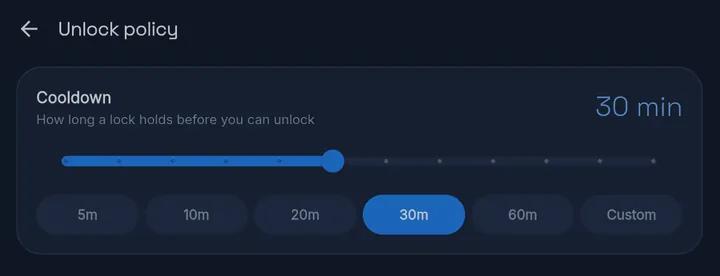
For a lock you start with Lock now, you also choose a minimum lock time (the app calls it the cooldown). It counts from the moment you lock. Until it’s over, scanning the QR code won’t open anything, so reaching the code early doesn’t help. On Free, choose from presets up to an hour. With Pro, set any length from 1 to 600 minutes.
A charging unlock (Pro) never waits for it. An NFC tag (Pro) skips the wait for the first unlock; the walk to the tag is the friction.
Step 3: Add a pause for the apps you keep (Free)
Some apps you don’t want to ban. You just want to notice. Gentle Nudge puts a calm pause in front of them and shows how many times you’ve reached for the app today. “Not now” takes you back. “Open anyway” lets you in: it’s a nudge, not a lock.
- It has its own list of apps, separate from your locks.
- Nudge on every open, or only after a few opens a day.
- Choose how long it waits before nudging again.
- If an app is also locked, the lock wins.
Step 4: Let a schedule start it (Free)
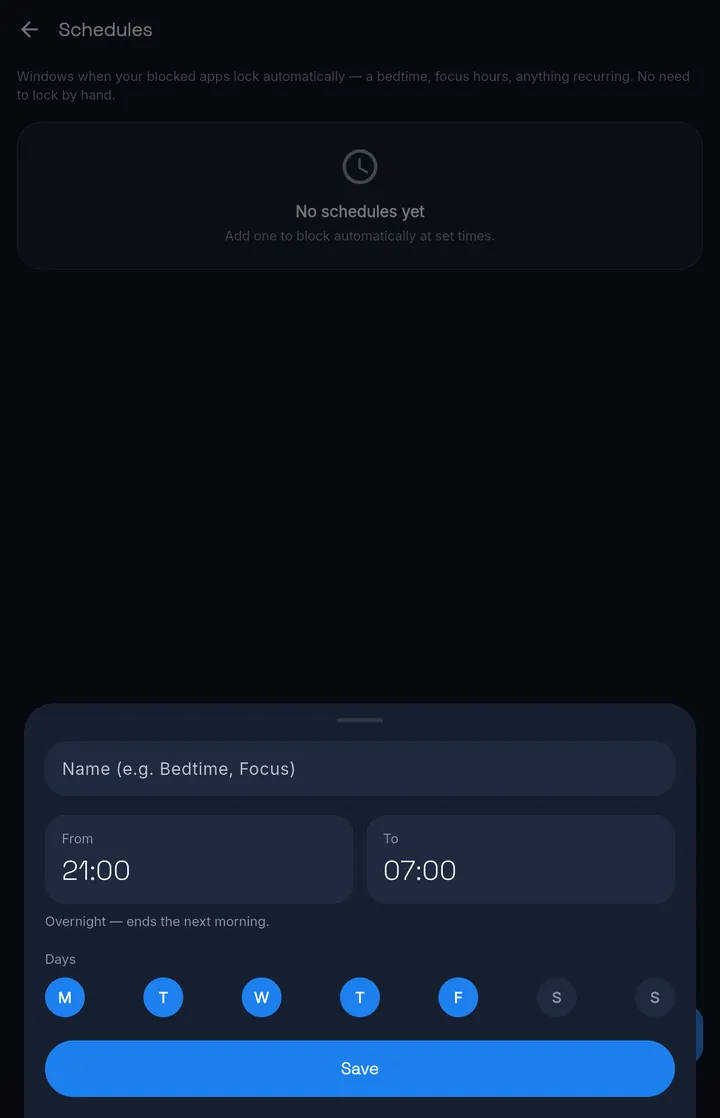
You don’t have to remember to lock. A schedule is a window when your blocked apps lock automatically: evenings, a bedtime, your working hours, any days of the week. Overnight windows end the next morning.
Nothing on the lock screen ends a schedule window early. Your apps open again when the window ends.
For example, 8 pm to 11 pm every evening: the detox hours start on their own, and the rest of the day stays normal.
Step 5: Make it harder to undo (Pro)
On the Free plan, settings stay open during a lock, so the quickest exit is to edit the blocklist or the schedule. Two Pro tools make that slower.
Strict mode
ProMassBlocker’s settings, and ending a session, need a PIN. Set it, then give it to a friend, a flatmate or a partner for the length of the detox. Whoever holds it can open your apps early.
In strict mode, the app’s own QR code and its 3-word code are switched off. Your PIN, or a QR you enrolled yourself, still works. So does an NFC tag or charger key.
Uninstall protection
ProBlocks the quick uninstall. Turning it off inside MassBlocker needs your PIN. It can still be switched off in Android Settings.
The honest limit
Strict mode is a strong deterrent, not an unbreakable jail — on stock Android a determined user can disable the service.
Android · Free on Google Play
MassBlocker, the app in this guide
MassBlocker is the Android app this setup runs on. On the Free plan you get QR unlocks, schedules and Gentle Nudge. Pro adds NFC and charging unlocks, strict mode and uninstall protection.
(opens in a new tab)No ads.
Try Pro free for 7 days — no card. Sign in to start.
See everything MassBlocker doesKeep reading
Related guides
FAQ
Questions
How long should a detox last?
This guide doesn't set a length for you. Pick one you can name before you start, such as a weekend, a week or the weeks before an exam. Use a schedule (Free) for the hours you want locked each day, and delete it when the detox is over.
Which apps should I block first?
The two or three you open without deciding to. On phones that include Digital Wellbeing, its page in Settings shows which apps you use most; start with the ones you can't account for. A short list is easier to keep than a long one.
What if I need one app for work?
Leave it off the blocklist: block the feed, keep the tool. If one app is both, give it a Gentle Nudge (Free) instead of a lock. You get a short pause and a count of today's opens, and you can still open it.
Does this stop notifications too?
No. MassBlocker blocks whole apps from opening; it doesn't block notifications. Turn off notifications for the same apps in Android Settings at the same time.
Does MassBlocker measure my screen time?
No. It shows simple counters, like locks started and waits finished. There are no screen-time reports.