
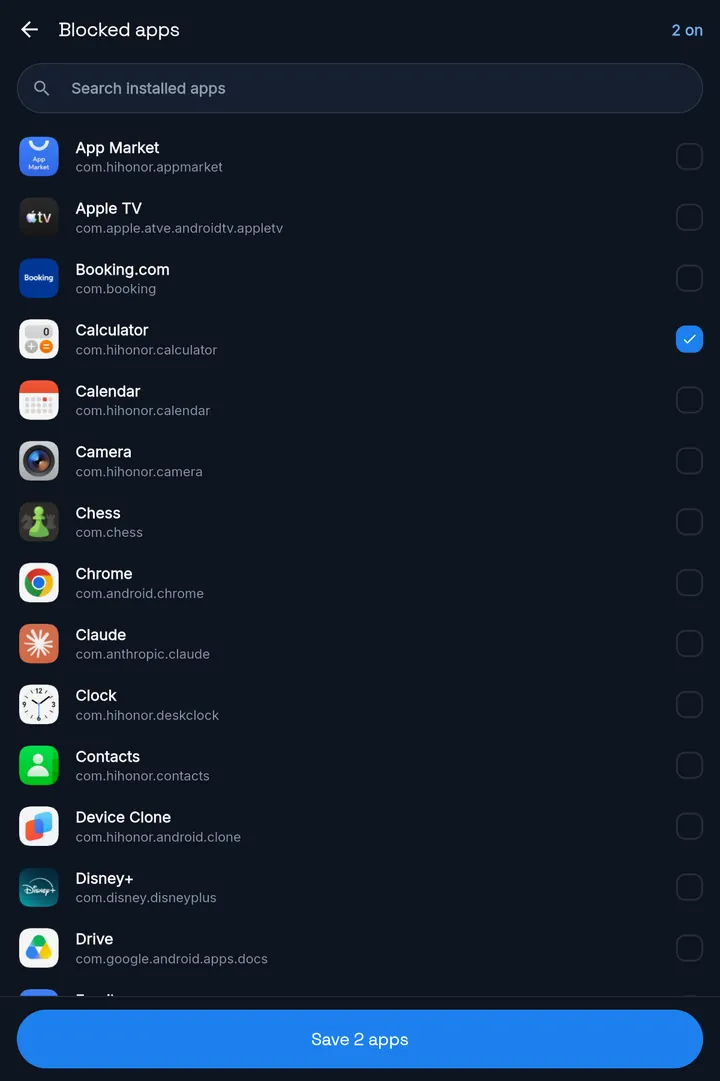
Step 1: Pick your apps.
Choose the apps that take your time. Everything else on your phone keeps working. Study with YouTube lectures? Leave YouTube unlocked.
MassBlocker · App blocker for Android
MassBlocker locks the apps you choose. To open them again, you scan the QR code you hid, once the minimum lock time you set is over. With Pro, your key can also be an NFC tag or your charger.
Free plan · no account needed · no ads
MassBlocker is an Android app blocker that makes unlocking a real-world action.
MassBlocker is an Android app blocker with a real-world unlock. To open a locked app, scan a QR code you hid, after a minimum lock time you set. Pro adds NFC tag and charger unlocks. Free plan, no ads.
Why limits slip
You set a limit when you're rested. You need it when you're tired.
On phones that include Digital Wellbeing, its timer is useful. But you can change it in Settings in a few taps.
It works until you install it again.
Easy to make at 9 am. Easy to bend at 1 am.
MassBlocker moves the way out off the screen. Its lock screen has no early way in: to open a locked app, you go and get your key.
Without strict mode, you can still change your settings during a lock. Strict mode (Pro) puts them behind a PIN.
…use the built-in timer?
Digital Wellbeing is free on phones that include it. If it works for you, keep using it. MassBlocker's lock screen has no skip button: it asks for a key you put somewhere else. With strict mode (Pro), changing your settings during a lock needs a PIN too.
…delete the app?
That lasts until you install it again. MassBlocker leaves the app on your phone and moves the key.
…use a monitoring app?
Those are built to report on someone. MassBlocker Family (Family) shares limits and simple lock counts. Never screen time, app usage, location or messages.
…buy a focus gadget?
That's one more thing to buy and carry. MassBlocker uses a printed QR code (Free), or an NFC sticker or your charger (Pro).
How it works
Choose the apps that take your time. Everything else on your phone keeps working. Study with YouTube lectures? Leave YouTube unlocked.
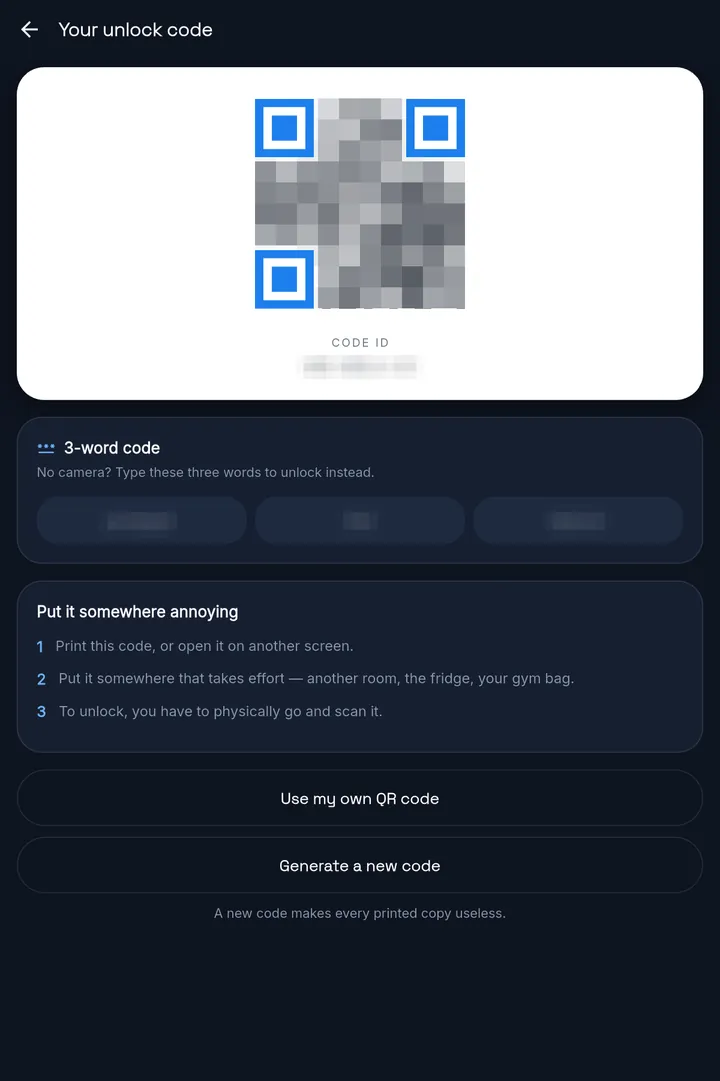
Print your QR code and put it somewhere that takes effort: another room, the fridge, your gym bag. No printer? Use any QR you own, like a sticker or a loyalty card with a QR code. It replaces the app's code.
Tap Lock now. A locked app shows the lock screen with a countdown. When your minimum lock time is over, it tells you: “Go find your code and scan it.” The app stays locked until you do.
ProWith Pro, an NFC tag or your charger can be your key instead. Then the effort is the walk to the tag, or to the plug.
Your key
Print the app's code and hide it. Scan it once your minimum lock time is over.
Any QR works: a sticker, a loyalty card with a QR code, one you printed. It replaces the app's code.
No camera? Type three words instead. They're also shown in the app, so they add a wait, not a hidden key. Strict mode switches them off.
Stick a tag somewhere out of the way. Walk to it and tap to unlock. The first unlock has no wait.
Your apps stay locked until you plug in. Once it's charging, tap Unlock to end the lock. No timer.
Unlock methods
You choose your way back in before you lock. Here is each option, which plan it is on, and whether it waits for your minimum lock time.
For a lock you start with Lock now:
| Way back in | Plan | Waits for your minimum lock time? |
|---|---|---|
| Scan the app's QR code | Free | Waits for your minimum lock time?Yes |
| Scan your own QR code | Free | Waits for your minimum lock time?Yes |
| Type the 3-word code | Pro | Waits for your minimum lock time?Yes |
| Tap your NFC tag | Pro | Waits for your minimum lock time?Not for the first unlock. With auto-relock on, each re-lock waits again before the tag works. |
| Plug in your charger | Pro | Waits for your minimum lock time?No. Plug in, then tap Unlock. That ends the lock. |
| Enter your PIN | Pro | Waits for your minimum lock time?No. It opens your apps straight away, so give it to someone else. |
The minimum lock time
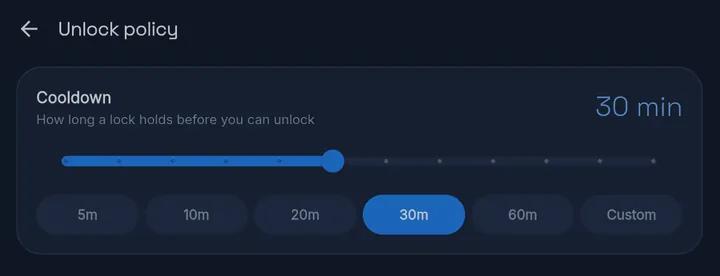
That's what MassBlocker's lock screen says while it counts down.
You set a minimum lock time in advance. It starts the moment you tap Lock now, not when you start wanting the app back. Until it's over, a QR scan or 3-word code won't open anything. When the ring turns green, you've earned it: go and find your code.
Start gentle. Go strict.
For apps you want to use less, not ban. Before the app opens, a calm pause shows how many times you've reached for it today. Then you choose: Not now, or Open anyway.
Changing settings or ending a session needs a PIN. Set it, then give it to someone you trust: whoever holds the PIN can open your apps early. The app's own QR code and 3-word code switch off. Your PIN, your own QR, an NFC tag or the charger still work.
Blocks the quick uninstall. Turning it off inside MassBlocker needs your PIN.
Strict mode is a strong deterrent, not an unbreakable jail — on stock Android a determined user can disable the service.
Read what MassBlocker can't doSet it once
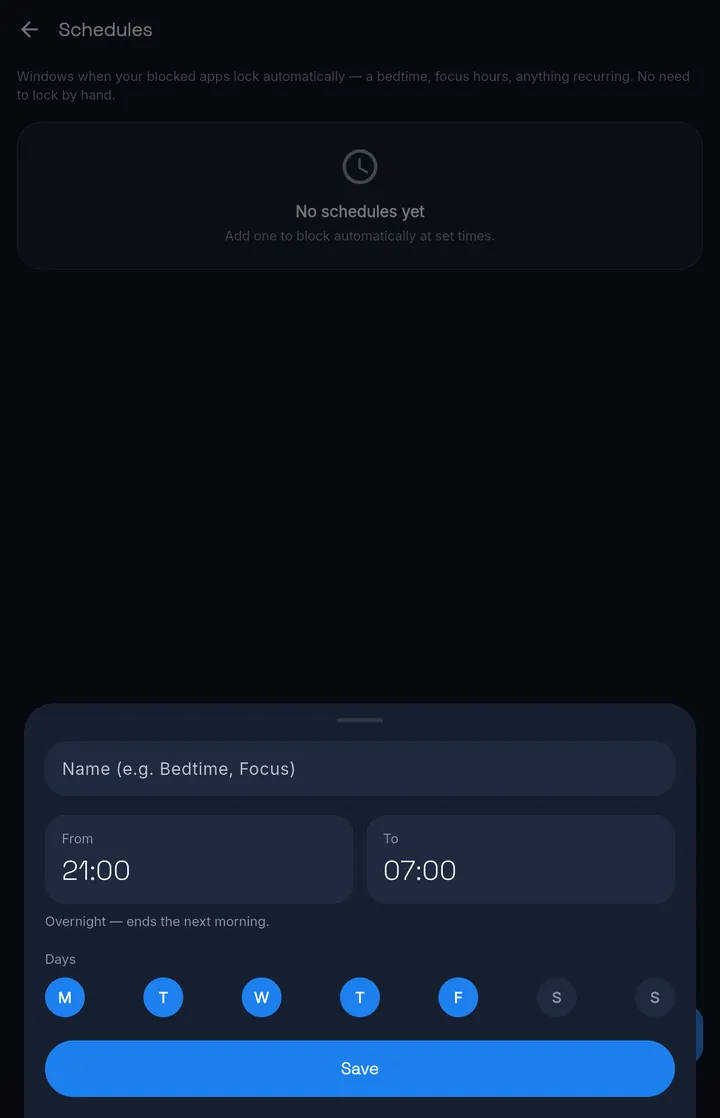
Schedules lock your blocked apps at the hours and on the days you choose, then open them again when the window ends. No need to lock by hand. Schedules are free.
University finals or a professional exam coming up? Make a study-hours schedule, Monday to Saturday. Feeds and games lock at the start and open again at the end. The apps you study with stay open.
An overnight schedule, 11 pm to 7 am. Your apps open again in the morning.
A lock covers the whole phone, for everyone who uses it. Keep it inside a schedule, and the phone works as normal outside your hours.
Profiles Free: 1 Pro: unlimited — each with its own apps and hours. With Pro, each can also have its own way to unlock.
Read this before you install
Here is exactly where MassBlocker stops, so you know before you install.
MassBlocker Family
FamilyOne plan for up to 5 people, each with the whole of Pro on their own phone. One person pays and keeps a master unlock code. You can leave a short note on each person's lock screen.
Privacy and permissions
MassBlocker uses the Android Accessibility API to deliver its core feature: blocking apps. The accessibility service detects when an app on your blocklist comes to the foreground and immediately shows the lock screen. Without this permission, MassBlocker cannot tell which app you just opened, and blocking cannot work.
MassBlocker uses the accessibility service only to read the package name of the app currently in the foreground so it knows whether to block it. It does not read the content of your screen, capture text you type, or monitor what you do inside other apps. Accessibility data stays on your device and is never collected, shared, or sold.
Pricing
For starting the habit.
S$0
No account needed. No ads.
For you.
S$80.99
Pay once
Lifetime costs less than two years of Yearly.
Everything in Free, plus:
Try Pro free for 7 days — no card. Sign in to start.
For up to 5 people.
S$134.99
Pay once
Lifetime costs less than two years of Yearly.
Everything in Pro, for up to 5 people, plus:
Prices in Singapore dollars. Checkout may show the amount in your local currency.
Paid plans are bought on the web through Stripe, not through Google Play. The app itself shows no prices.
Lifetime is one payment for the paid features available when you buy.
Strict mode is a strong deterrent, not an unbreakable jail — on stock Android a determined user can disable the service.
Questions
Yes. The Free plan locks the apps you choose, with QR code unlocks, schedules, Gentle Nudge, one profile and a daily limit on lock sessions. It needs no account and has no ads. Pro and Family add more ways to unlock and stricter controls.
You set a minimum lock time in advance, and the lock screen has no button to skip it. After that, you still need your key: the QR code you hid, or the 3-word code (Pro). NFC and charging unlocks (Pro) skip the wait for the first unlock, but you need the tag or the charger. A PIN (Pro) opens a lock you started at any time, so give it to someone else. Profiles don't use the minimum lock time: a profile's key opens it straight away. Without strict mode, you can still edit your blocklist and schedules during a lock; strict mode (Pro) puts them behind a PIN.
Without strict mode, yes. You can edit your blocklist, schedules and profiles during a lock, and on Pro, changing the unlock method ends the lock. Strict mode (Pro) puts settings and ending a session behind a PIN, so give the PIN to someone you trust.
On the Free plan, yes. With Pro, uninstall protection blocks the quick uninstall, and turning it off inside MassBlocker needs your PIN. It can still be switched off in Android Settings. Strict mode is a strong deterrent, not an unbreakable jail — on stock Android a determined user can disable the service.
Strict mode is part of Pro. Settings and ending a session need your PIN. If your key is a QR code, the app's own code and its 3-word code are switched off. Your PIN, or a QR you enrolled yourself, still gets you back in. An NFC tag or charger key works as usual. Strict mode is a strong deterrent, not an unbreakable jail — on stock Android a determined user can disable the service.
Generate a new code in the app and print it again. Every old copy stops working. Or use any QR you own as your key: a sticker, a loyalty card with a QR code, one you printed. It replaces the app's code. In strict mode (Pro), changing this needs your PIN.
No. NFC is one Pro option. QR codes use your camera, the 3-word code (Pro) needs no camera, and charging unlocks (Pro) only need your charger.
No. It uses Android's accessibility service only to see which app is in the foreground so it knows whether to block it. It never reads screen content, keystrokes, or what you do inside other apps. Accessibility data stays on your device and is never collected, shared, or sold.
On phones that include Digital Wellbeing, its app timers are free, and you can change them in Settings at any time. MassBlocker locks the app and puts the key somewhere else: a QR code you hid, or with Pro, an NFC tag or your charger. Without strict mode, you can still edit your blocklist during a lock; strict mode (Pro) puts your settings behind a PIN.
No. MassBlocker blocks whole apps. It doesn't block websites, single features inside an app such as Reels or Shorts, or notifications.
No. MassBlocker is a self-control app for adults. It has no location tracking, no message reading, no browsing history, no screenshots or screen recording, and no screen-time reports. The Family plan shares limits that people in a household agree on, plus simple lock counts.
Yes. A lock covers the whole phone, not one person. On a shared phone, use a schedule so apps lock only during your study or work hours.
If MassBlocker's blocking service gets switched off, the app shows a banner on its home screen: “Blocking is switched off”, or during a lock, “A lock is running but not enforced”. It prompts you to turn the accessibility permission back on. No other alert is sent.
English, French, Spanish, Malay and Hindi. Pick one when you first open the app, and change it any time from the home screen.
Yes. Try Pro free for 7 days — no card. Sign in to start, with your email and a 6-digit code. One trial per install.
No. MassBlocker is Android-only for now.
Get started
Install MassBlocker, allow the accessibility permission, pick your apps and hide your code. That's the setup. Free on Google Play, with no ads.
Try Pro free for 7 days — no card. Sign in to start.
MassBlocker
Free plan · no ads