
MassBlocker Family · For Android
Phone limits you agree on together.
One plan for up to 5 people, each with the whole of Pro on their own Android phone. You agree on the rules together. Whoever runs the group keeps a master unlock code and can leave a short note on each person's lock screen.
Everyone installs MassBlocker free. One person pays for Family.
What is MassBlocker Family?
MassBlocker Family gives up to 5 people MassBlocker Pro on their own Android phones, plus a master unlock code and a short message on each member's lock screen. No location tracking, no message reading, no screen-time reports.
How Family works
Agree first. Then set it up.
Step 1: Talk it through.
Agree on which apps lock, during which hours, how each person unlocks, and who runs the group.
Step 2: One person gets Family.
Payment is a web checkout run by Stripe, not Google Play.
Step 3: Invite your people.
FamilyCreate a group and an invite. Each person installs MassBlocker on their own phone, taps “Have an invite code?” when signing in, then scans your invite QR or types the code.
Step 4: Set up each phone.
ProEveryone gets the whole of Pro: unlimited locks and profiles, NFC and charging unlocks, the 3-word code and strict mode. Schedules are free for everyone. Set it up the way you agreed.
Step 5: Leave a note.
FamilyWrite a short message for someone's lock screen: up to 120 characters, one line, no links.
FamilyExample: a note on a lock screen
What's included
Pro on every phone, plus what only Family has.
Everyone in the group gets Pro
Pro- Unlimited locks
- NFC tag, charging-cable and 3-word unlocks
- Any minimum lock time from 1 to 600 minutes (the app calls it the cooldown)
- Unlimited profiles, including Hard block
- Auto-relock
- Strict mode with a PIN
- Uninstall protection (a deterrent)
Strict mode is a strong deterrent, not an unbreakable jail — on stock Android a determined user can disable the service.
Only on Family
FamilyA master unlock code
One code you keep. Print it or keep it on your phone. It goes through the member's own Scan unlock: if their lock screen offers Scan, your code opens it. Some locks have no Scan option, so it can't open them: NFC-tag and charger locks, schedule windows, and strict mode without their own QR code. If it gets out, rotate it. The old code stops working on each phone once that phone is back online.
A message on each lock screen
Up to 120 characters, one line, no links. It shows at the top of their lock screen when an app is blocked.
Room for up to 5 people
Invite the others by QR code or invite code. One person pays.
Message examples
Not surveillance
It locks apps. It doesn't watch people.
MassBlocker has
- No location tracking
- No message reading
- No browsing history
- No screenshots or screen recording
- No screen-time reports
It doesn't ask for:
location, contacts or SMS permissions.
What the group can see:
Who's in the group, each person's lock-screen message, and simple lock counts. Never screen time, app usage, location or messages.
Strict mode is a strong deterrent, not an unbreakable jail — on stock Android a determined user can disable the service. If someone switches blocking off, only their own phone shows a warning. Nobody else is alerted. That's why Family works best as something everyone agreed to.
How the accessibility permission is usedWho it's for
For households that want the same rules.
- Family
Exam month at home
Two siblings home from university agree on study hours. Each sets the same schedule on their own phone, turns on strict mode and gives the PIN to the other.
- Family
Dinner without phones
Everyone sets the same 8 to 9 pm schedule on their own phone. The person who runs the group adds a note to each lock screen: “Dinner at 8. Phones down for all of us.”
- Family
Partners and flatmates
Two or three adults who want to stop scrolling in bed set the same overnight schedule on each phone. Their apps open again in the morning. One Family plan gives each of them Pro.
Family is for people who have agreed to the rules. It is not a parental-control app.
One phone, shared?
Sharing one phone? You may not need Family.
Family is for up to 5 phones. If your household shares one, use a schedule Free to lock the apps you agree on during study hours. For locks you start by hand, let one person keep the printed code. More than one profile on that phone needs Pro.
How schedules work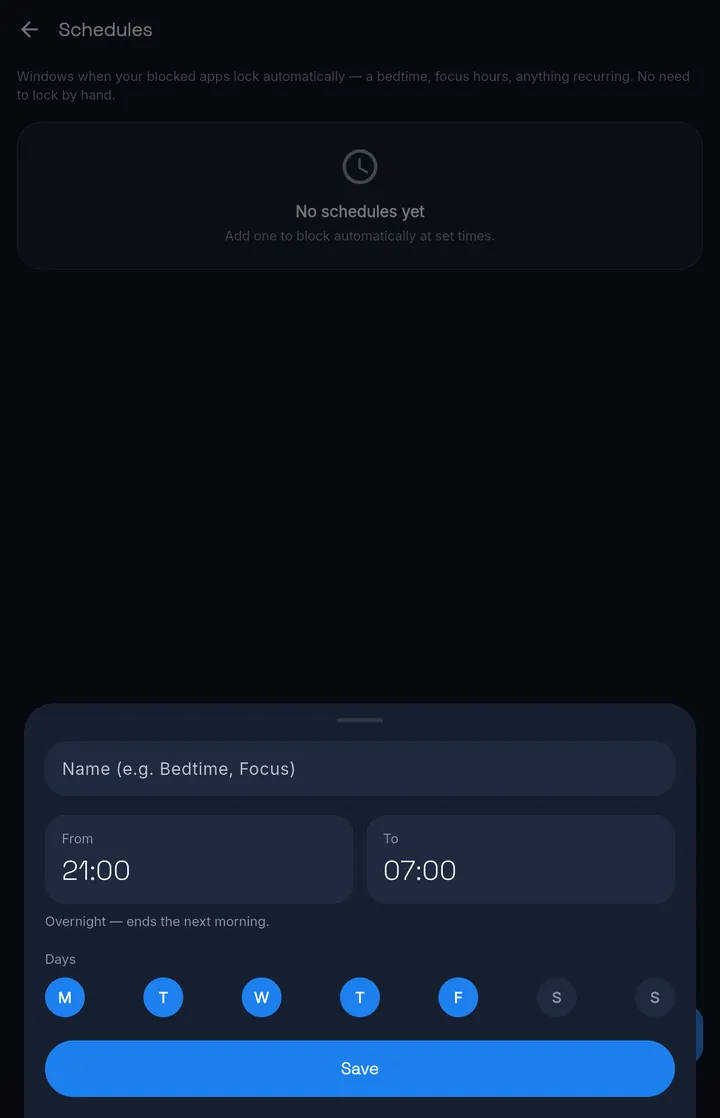
PricingFamily
One plan for up to 5 people.
Family
S$134.99
Pay once
Lifetime costs less than two years of Yearly.
Includes:
- Everything in Pro for up to 5 people
- A master unlock code you keep
- A message on each person's lock screen
- Invites by QR code or invite code
Prices in Singapore dollars. Checkout may show the amount in your local currency.
Paid plans are bought on the web through Stripe, not through Google Play. The app itself shows no prices.
Lifetime is one payment for the paid features available when you buy.
Want to try first? Try Pro free for 7 days — no card. Sign in to start. The trial is Pro on your own phone; groups need Family.
Questions
Before you set it up
Is MassBlocker Family a way to monitor someone?
No. Family shares Pro and a set of limits people have agreed on. MassBlocker has no location tracking, no message reading, no browsing history, no screenshots or screen recording, and no screen-time reports.
What can the person who runs the group see?
Who's in the group, the lock-screen message they set for each person, and simple lock counts for each person: locks started and locks today. Never screen time, app usage, location or messages.
How many people does Family cover?
Up to 5 people, each on their own Android phone. One person pays; everyone else joins free and gets the whole of Pro.
How do people join?
Each person installs MassBlocker, taps “Have an invite code?” when signing in, then scans your invite QR or types the invite code.
Does everyone need an account?
Yes. Joining a group means signing in with an email address and a 6-digit code. No password. The Free plan on its own needs no account.
What does the master unlock code do?
It's a code you keep, printed or on your phone. It goes through the member's own Scan unlock: if their lock screen offers Scan, your code opens it. On a lock they started by hand, Scan appears once their minimum lock time is over. Locks with no Scan option are out of reach: NFC-tag and charger locks, schedule windows, and strict mode without their own QR code. If a copy goes missing, rotate it. The old code stops working on each phone once that phone is back online.
Can the person running the group change how I unlock?
Yes. They can turn on Remote-only unlock for you. That switches off your own code, so only their master code unlocks your phone. Agree on it together before anyone turns it on.
What can I write on someone's lock screen?
One line of up to 120 characters, with no links. It shows at the top of that person's lock screen when an app is blocked.
Can someone just switch it off?
If they're determined, yes. Strict mode is a strong deterrent, not an unbreakable jail — on stock Android a determined user can disable the service. Only their own phone shows a warning; nobody else is alerted. That's why Family works best as something everyone agreed to.
Is Family part of Pro?
No. Family is its own plan. Pro is for one person; Family is Pro for up to 5 people, plus the master unlock code and lock-screen messages.
We share one phone. Do we need Family?
Probably not. Use a schedule (Free) on that phone to lock the apps you agree on at set hours. More than one profile needs Pro.
Does Family work with iPhones?
No. MassBlocker is Android-only for now, so everyone in the group needs an Android phone.
Get started
Agree on it tonight.
Everyone installs MassBlocker free. One person adds Family when you're ready.

MassBlocker
Free plan · no ads